SAP Solution Manager 7.2 end of maintenance: 2027 Is Closer Than You Think
A Practitioner’s Guide to Migrating from SAP Solution Manager to Cloud ALM
Published March 2026 | henkadigital.com
The Deadline Is Real. The Migration Is Not What You Think It Is.
SAP Solution Manager 7.2 reaches end of mainstream maintenance in December 2027. Extended maintenance is available through 2030, but at additional cost and with no new feature development. For the thousands of enterprises that have built their application lifecycle management around Solution Manager over the past two decades, this is not a distant concern. It is a program that should already be in planning.
And yet the most common reaction we see is a version of the same mistake: treating this as a tool migration. Solution Manager out, Cloud ALM in, six months, done.
It is not that simple. SAP Cloud ALM is not a direct successor to Solution Manager. It is a different platform, built on different technology, with a different philosophy. Some Solution Manager capabilities have direct equivalents in Cloud ALM. Others do not exist in Cloud ALM at all. And several require a fundamental rethinking of how your organization manages change, tests software, and operates its SAP landscape.
This article is the guide we wish our clients had before they started. It covers what you need to assess, how to classify your migration effort, the decisions that matter most, and the mistakes that cost the most time when made late.
Start with What You Actually Use
The first step is not evaluating Cloud ALM. It is understanding what you have in Solution Manager today. This is often significantly underestimated.
Solution Manager is not a single tool. It is a collection of capabilities that have accumulated over years of configuration, customization, and integration. A typical mid-to-large enterprise uses some combination of: solution documentation and business blueprinting, test management (manual and automated), Change Request Management (ChaRM), IT Service Management (incident, problem, service request), technical and business process monitoring, custom code management, landscape management, and a web of integrations connecting Solution Manager to Jira, ServiceNow, Azure DevOps, and dozens of managed SAP systems via RFC.
Before you can plan a migration, you need a current-state inventory that captures every active capability, the number of objects or configurations behind it, its complexity, its integration points, and its business criticality. This is not a checkbox exercise. It is the foundation of every effort estimate, timeline, and budget that follows.
We have run this assessment for clients with as few as 8 active Solution Manager capabilities and as many as 30. The difference in migration effort between the two is not linear; it is exponential, driven primarily by custom developments, third-party integrations, and the depth of ChaRM configuration.
Four Migration Paths, Not One
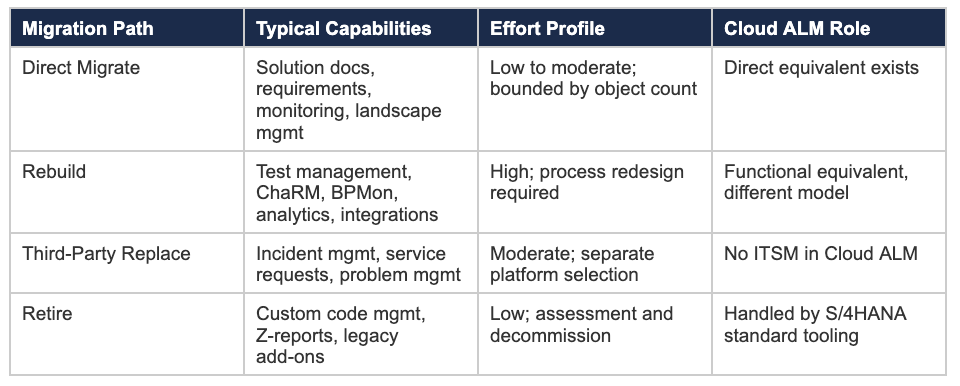
Not everything in Solution Manager goes to Cloud ALM. This is the single most important thing to understand early. Each component in your inventory will follow one of four migration paths, determined by what Cloud ALM offers and what it does not.
Direct Migrate
These are capabilities where Cloud ALM has a functional equivalent and migration is relatively straightforward. Project management, requirements management, solution documentation, and basic operational monitoring fall into this category. The effort is real but bounded: you are recreating configurations and content in a new platform, not redesigning processes.
Rebuild
These are capabilities where Cloud ALM has a corresponding feature but the data model, workflow, or approach is fundamentally different. This is the largest and most dangerous category. Test management is the most common example: manual test cases cannot be imported from Solution Manager into Cloud ALM. They must be recreated. If you have hundreds or thousands of test cases, this is not a weekend project. Change Request Management is another: ChaRM workflows in Solution Manager are deeply customized in most organizations. Cloud ALM’s Deployment Management takes a more standardized approach. The redesign is not optional.
Third-Party Replace
Cloud ALM does not include IT Service Management. If you run incident management, problem management, or service request fulfillment through Solution Manager today, you need a dedicated ITSM platform. ServiceNow and Jira Service Management are the most common choices. This is a separate project with its own budget, timeline, and organizational impact.
Retire
Some Solution Manager capabilities are no longer needed in their current form. Custom code management, for example, is increasingly handled by SAP’s standard S/4HANA tooling (Custom Code Migration Worklist). Z-reports built inside Solution Manager should be evaluated individually: some can be retired, others need to be redeveloped outside the Solution Manager context. The key decision is whether each custom object still serves a business need, not whether it can be migrated.
Migration Path Summary
Where the Effort Actually Lives
In our experience, three areas consistently account for 70% or more of total migration effort. If you plan for these correctly, the rest of the program is manageable.
1. Test Management (the silent majority of effort)
Manual test cases are the single largest effort driver in most migrations. There is no import path from Solution Manager to Cloud ALM. Every test case must be evaluated, cleaned, and recreated. Organizations with 500+ manual test cases should expect this workstream alone to take several hundred person-days. If you also run automated test scripts through Solution Manager, those must be re-engineered for Cloud ALM’s test automation framework or migrated to a third-party tool like Tricentis.
2. Change Request Management (ChaRM)
ChaRM is where Solution Manager’s depth is hardest to replace. Most enterprises have spent years configuring approval workflows, quality gates, and transport management rules that reflect their specific governance requirements. Cloud ALM’s Deployment Management is deliberately more standardized. The migration is not a technical lift-and-shift; it is a governance redesign. Organizations that skip this work and try to replicate ChaRM logic in Cloud ALM will fail, because Cloud ALM does not support the same level of customization. The right approach is to treat the transition as an opportunity to simplify, but that simplification requires careful analysis of which governance controls are essential and which are organizational habit.
3. Third-Party Integrations
Solution Manager connects to managed systems via RFC. Cloud ALM uses REST APIs and SAP BTP. Every integration point needs to be re-architected: Jira, ServiceNow, Azure DevOps, and all 30 to 50 RFC connections to your managed SAP landscape. The effort scales with the number of integration points, not the number of integration objects. A single Jira connector with a complex bidirectional sync is more effort than ten simple RFC registrations.
The Parallel Run Reality
Most categories require a period where both Solution Manager and Cloud ALM run simultaneously. This is not optional for testing, change management, operations monitoring, service management, or integrations. You cannot switch off ChaRM on a Friday and turn on Cloud ALM Deployment Management on a Monday. There will be weeks or months where your teams operate in both systems.
This has real cost implications. Parallel run adds overhead to every affected workstream, typically 10% to 20% of the base effort for those components. It also has organizational implications: your teams need training on the new platform while still operating the old one, and your governance model needs to account for the transition period without creating gaps in change control. This is precisely the kind of program complexity where an independent delivery intelligence layer, one that operates above and alongside both platforms, earns its value.
Plan for it. Budget for it. The organizations that get hurt are the ones that assume a clean cutover and discover mid-migration that their testing teams need to operate in two systems for three months.
Five Mistakes That Cost the Most When Made Late
1. Treating it as a technical migration
This is a program governance and process redesign initiative. The technical platform swap is the easy part. The hard part is redesigning how your organization manages change, tests software, and monitors operations. If your project plan does not include process workshops and organizational change management, it is incomplete.
2. Starting with Cloud ALM evaluation before completing the current-state inventory
You cannot build a credible migration plan until you know what you have. We have seen organizations spend months evaluating Cloud ALM features before realizing they have 1,500 manual test cases, 67 custom ABAP reports, and a ChaRM configuration that touches 8 downstream systems. The inventory comes first. Always.
3. Underestimating the ITSM gap
Cloud ALM does not do IT Service Management. If your organization runs incident management through Solution Manager, you need a separate ITSM platform. This is not a configuration change; it is a tool selection, procurement, and implementation project that runs in parallel with the Cloud ALM migration. Start it early.
4. Assuming Cloud ALM will replicate ChaRM
It will not. Cloud ALM’s Deployment Management is simpler and more standardized by design. Organizations with heavily customized ChaRM workflows need to accept that the migration will involve governance simplification, not feature replication.
5. Ignoring the integration re-architecture
RFC connections do not migrate. Every managed system registration and every third-party tool connector must be re-established through Cloud ALM APIs and SAP BTP. If you have 40+ integration points, this is a significant workstream that requires SAP BTP architecture expertise.
How to Sequence the Migration
Based on our experience, the most effective sequencing follows the risk-and-dependency logic of the migration paths themselves.
Phase 1: Direct Migrate (months 1 to 6)
Start with the capabilities that have direct Cloud ALM equivalents and the lowest redesign risk. Solution documentation, requirements management, and operational monitoring (system health, interface monitoring, job monitoring) establish Cloud ALM as your working platform. This builds organizational familiarity before the harder phases. The Implementation category does not require a parallel run, which further de-risks the start.
Phase 2: Rebuild (months 4 to 14)
The Rebuild path is the heaviest workstream and should start overlapping with Phase 1 once the team has Cloud ALM proficiency. Within Rebuild, prioritize Change Management (ChaRM redesign) and Testing (test case migration) first, because these are the most complex and have the longest parallel run requirements. Analytics and integration rebuilds can follow once the core governance and testing framework is in place.
Phase 3: Third-Party Replace (parallel workstream)
ITSM platform selection and deployment should run as an independent parallel workstream from month 1. It has no dependency on Cloud ALM and involves different stakeholders (IT operations, service desk teams). Do not wait for the Cloud ALM migration to finish before starting this.
Phase 4: Retire and Decommission (months 12 to 16)
Custom code management objects and Z-reports are assessed and either retired or migrated to their new homes outside Solution Manager. This happens last because some objects may only become clearly disposable once Cloud ALM is operational and the organization can see what it no longer needs.
How henkadigital Approaches This
SAP Architecture Modernization is one of our three core service lines, and Solution Manager to Cloud ALM migration is at the center of it. This is not peripheral work for us. It is what we were built to do.
One of our co-founder holds the SAP BTP Solution Architect certification (P_BTPA_2408) and has delivered over 50 ALM and BTP projects across his career, including the environments we are now helping clients modernize. Our other co-founder led SAP ALM architecture at Deloitte and has run the governance programs that depend on these platforms. Between them, they bring the combination of hands-on technical depth and senior delivery experience that this type of migration demands.
What a henkadigital engagement looks like
Solution Manager Assessment. A structured current-state inventory of your entire ALM environment: active capabilities, custom developments, integration points, and organizational dependencies. This produces the migration classification, effort estimate, and phased roadmap that everything else builds on.
Cloud ALM Transition. Migration roadmap design and execution oversight. We handle the architecture decisions that account for your specific SAP landscape, integration dependencies, and operational model. This includes ChaRM-to-Deployment-Management redesign, test management migration planning, and BTP integration architecture for third-party connectors.
Ranti: Delivery Intelligence for the migration itself. An ALM migration is itself a complex program, and it deserves the same governance discipline as the S/4HANA transformation it runs alongside. Ranti is henkadigital’s flagship delivery intelligence product, purpose-built for exactly this: it provides continuous RAID management, scope drift monitoring as requirements shift during ChaRM redesign, and decision-ready steering packs for the executive sponsors tracking progress against the 2027 deadline. Beneath Ranti, our in-program autopilots (RAID Intelligence, Steering Intelligence, and Scope and Schedule Monitor) handle the granular governance activities that would otherwise consume senior consultant time without requiring senior consultant judgement.
What makes Ranti particularly relevant for ALM migrations is its Knowledge pillar. Solution Manager contains years of accumulated institutional knowledge: why specific ChaRM workflows were designed, which business process monitoring rules reflect real operational pain, which integrations carry undocumented dependencies. That knowledge is at risk of being lost during the migration. Ranti captures it as a living layer that grows over time, preserving the context behind decisions so it is available long after the migration team has moved on.
We do not just advise on these transitions. We have built and run the environments we are helping clients modernize. And Ranti ensures that the intelligence captured during the migration does not walk out the door when the project closes.
When to Start
If you are reading this in 2026 and have not begun planning, you are not too late, but you are later than you should be. A typical mid-to-large enterprise should expect the full migration to take 12 to 18 months from assessment to Solution Manager decommission. That puts the latest responsible start date somewhere around mid-2026 for a December 2027 target.
The extended maintenance option (through 2030, at additional cost) provides a buffer, but it should be treated as a contingency, not a strategy. SAP has been clear that Cloud ALM is the strategic direction. No new features are coming to Solution Manager. The longer you wait, the less organizational capacity you have to manage this alongside the S/4HANA migration that is almost certainly running in parallel.
The conversation usually starts with a specific question about one part of the migration. It rarely stays there. If your organization is navigating this transition and wants a direct, practitioner-level assessment of what the effort actually looks like, we are easy to reach.
Ready to assess your migration?
henkadigital provides Solution Manager assessments, Cloud ALM transition oversight, and SAP BTP architecture design, delivered by practitioners who have built and run these environments.