Release Management for Hybrid SAP Landscapes
ChaRM, Focused Build, and the Path to Cloud ALM
henkadigital | March 2026 | Roger Tchalla
Originally published December 2019. Revised and expanded for henkadigital, March 2026.
Why Release Management Still Matters
Release management in hybrid SAP landscapes is one of those topics that separates programs that deliver reliably from programs that spend weekends debugging production imports. It is not glamorous work. But when it breaks, everything downstream breaks with it.
This article is a practitioner guide to release management using SAP Solution Manager's two primary change control tools: Change Request Management (ChaRM) and Focused Build. It covers change logistics, transport of copies, batch imports, defect correction, release dashboards, and the handover-to-operations decision that every S/4HANA program must make. Each section is written to be directly usable by SAP ALM architects and release managers configuring these tools on live programs.
We originally published this guide in 2019, based on hands-on delivery and the openSAP course Agile Project Delivery with Focused Build for SAP Solution Manager. This 2026 revision updates the technical content for Focused Build 2.0 SP16, adds context for the 2027 Solution Manager end-of-mainstream-maintenance deadline, and frames each capability against its Cloud ALM successor. The core mechanics remain accurate and highly relevant: most organizations are still running Solution Manager today and will be through 2027 and beyond.
If you are planning an ALM modernization alongside an S/4HANA migration, this article doubles as a baseline for understanding what you are migrating from, and what Cloud ALM does (and does not yet) replace.
1. Best Practices for Change Logistics
Whether you are using ChaRM or Focused Build, the foundational best practices for transport management in hybrid landscapes are the same. These apply across brownfield conversions, greenfield implementations, and dual-landscape maintenance scenarios.
1.1 Transport Control via CTS+
All ABAP and non-ABAP technologies should be managed through the enhanced Change and Transport System (CTS+). This is the baseline. Without centralized transport control, release management becomes a coordination exercise conducted over email and spreadsheets.
The key principles:
Create and release transports in the direct context of work items. Transports should always be traceable back to a specific requirement or change document. Standalone transports with no governance context are how production incidents start.
Control technical deployment via workflow. The transport release and import sequence should be governed by the change management workflow, not by individual developers making ad hoc decisions about when to move code.
Remove the option to create transports directly on backend systems. All transport creation should be initiated from Solution Manager. This eliminates the single most common source of transport conflicts and undocumented changes.
Use transport of copies. This is the mechanism that makes iterative testing possible. We cover it in detail in the next section.
1.2 Transport of Copies
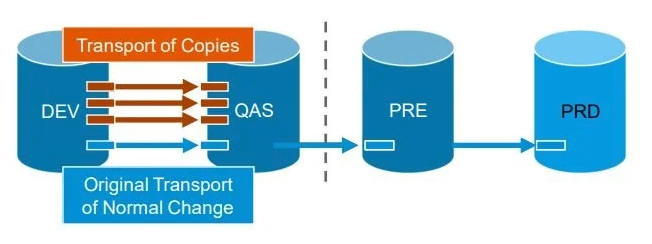
Transport of copies (ToC) is the mechanism that allows iterative testing without releasing original transports. Work items can be tested in QAS while development continues on the same objects in DEV. The original transport remains open and modifiable; only a snapshot is deployed to the test system.
© 2021 SAP SE or an SAP affiliate company. All rights reserved. ǀ PUBLIC
The transport flow works as follows: from DEV, a transport of copies is created and imported into QAS for testing. The original transport of the normal change remains in DEV. When the release enters the test phase and is ready for preproduction, the original transports are released and imported into PRE and then PRD.
This separation is critical. Without ToC, teams face a binary choice: either release transports early (losing the ability to make further changes) or delay testing until development is complete (compressing the test window). Neither is acceptable on a program with real deadlines.
1.3 Protective Controls
Three additional controls should be active in any properly configured Solution Manager landscape:
CSOL and downgrade protection. These generate warnings before creating a real downgrade situation. This is your early warning system for transport sequence violations.
Critical object blacklisting. Maintain a blacklist of critical objects that require additional approval before any change. This prevents well-intentioned developers from accidentally destabilizing core functionality.
Preliminary import capability. By default, Solution Manager creates an import sequence based on the order of release from DEV. Preliminary import allows you to decouple specific changes from the release sequence and accelerate their deployment when needed.
2. Software Deployment: The High-Level Process Flow
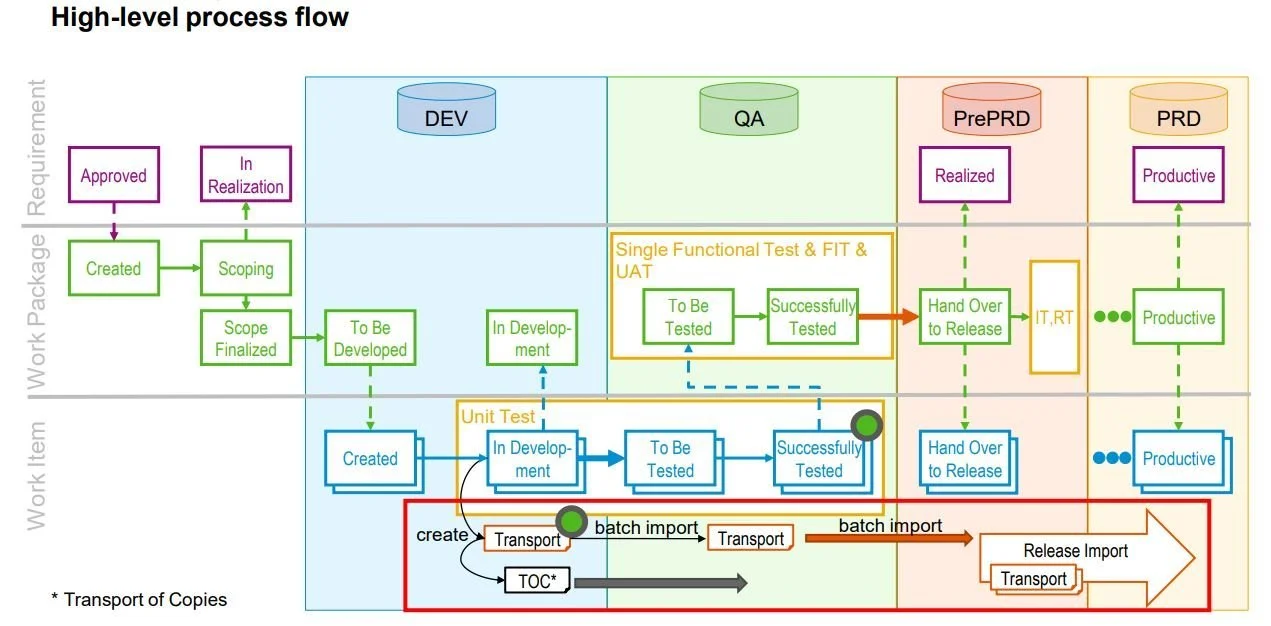
The end-to-end deployment process in Focused Build operates across three layers: Requirements, Work Packages, and Work Items. Understanding how these layers interact with the transport system is essential for configuring release management correctly.
© 2021 SAP SE or an SAP affiliate company. All rights reserved. ǀ PUBLIC
2.1 The Three-Layer Model
At the Requirement level, an approved requirement moves to "In Realization" status, signaling that development can begin.
At the Work Package level, the lifecycle moves from Created through Scoping, Scope Finalized, To Be Developed, In Development, and ultimately through testing to Productive status. Work packages define the functional scope of what needs to be built.
At the Work Item level, the actual development and transport creation happens. Work items move from Created through In Development, To Be Tested, Successfully Tested, Hand Over to Release, and finally to Productive. This is where transports are created, where transport of copies are generated for testing, and where batch imports move code through the landscape.
2.2 Import Mechanics
The import behavior differs by environment and transport type:
QAS / Transport of Copies — Automatically deployed into QAS. No batch job required.
QAS / Defect corrections and released transports — Batch job required. Recommended frequency: every 15 to 60 minutes.
PRE / Released transports (integration and regression test) — Batch job required. Daily import frequency is typically appropriate.
PRD / Release import — Controlled deployment via the release management workflow.
© 2021 SAP SE or an SAP affiliate company. All rights reserved. ǀ PUBLIC
The batch import program /SALM/BATCH_IMPORT_TRIGGER in SE38 handles the automated imports. It supports environment-specific variants (QAS, PRE, Production), scheduled recurring jobs, downgrade checks with the option to skip downgraded transports, and import simulation to identify errors before actual execution.
2.3 Transport Checks
Before importing, run the transport check program /SDF/CMO_TR_CHECK in SE38 to identify sequence violations, referenced objects that will cause import errors, and estimated import duration. This is a non-negotiable step before any production import. On programs we have run, we treat a failed transport check as a release gate: no deployment proceeds until the check is clean.
3. Release Management Architecture
Release management in Focused Build is structured around a hierarchy of five elements, each with a specific role and cadence:
Releases — Synchronize project go-lives and ensure continuous delivery and integration. Aligned to major deployment milestones.
Projects — Bundle deliverables. Multiple parallel projects are possible within a release, aligned to functional workstreams or implementation waves.
Phases — Structure the delivery lifecycle, ending with quality gates. The standard phases are Prepare, Explore, Realize, Deploy, and Run.
Waves — Define functional scope for user acceptance. Each wave ends with business acceptance testing. Typically 8 to 12 weeks.
Sprints — Development iterations with show-and-tell sessions for the business. Typically 2 weeks.
3.1 Combined Deployments
When multiple projects run in parallel within the same release, we strongly recommend synchronizing deployments. The benefits are material:
Reduced testing effort. Integration and regression tests are executed once across all projects rather than separately for each, significantly reducing the total test workload.
Lower destabilization risk. Cross-project functional dependencies are bundled and validated before they reach production. Unsynchronized deployments are how teams discover conflicts in production rather than in test.
The combined deployment model follows a straightforward pattern: each project runs its own Build and Functional Test phase, enters a synchronized freeze, then all projects proceed through a joint integration test phase before a coordinated go-live. The release lifecycle at the bottom level follows the phases: Scope, Build, Test, Deploy, Hypercare, and Operate.
4. Activities by Phase
Understanding what happens to work packages and change documents at each phase is essential for correct workflow configuration.
Prepare — Work packages and change documents are Created.
Build (In Development) — Tasks are released.
Build (To Be Tested) — Transport of copies imported to QAS.
Build (Successfully Tested) — Original transports released and imported to QAS.
Test — Handed Over to Release: original transports imported into PRE for integration and regression testing.
Deployment Preparation — Execute the technical steps to prepare the cutover. Run check report /SDF/CMO_TR_CHECK to validate the production import.
Deployment — Import in Production. Set productive status on work packages and change documents.
Hypercare — Monitor production stability. Defect correction and incident management processes activate.
4.1 Enhancing ChaRM to Behave Like Focused Build
One practical customization we have configured on multiple programs: enhancing the ChaRM workflow to include an explicit "Hand Over to Release" status, which Focused Build provides natively but ChaRM does not.
The approach is a configuration trick that avoids complex development:
Rename the existing "Successfully Tested" status to "Hand Over to Release." This preserves all existing transport release customizing tied to that status.
Create a new, simple intermediate status between "To Be Tested" and the renamed "Hand Over to Release." This new status, without any transport-specific attributes, becomes the new "Successfully Tested" and serves as the testing confirmation step.
Configure the additional customizing for actions, conditions, and security authorizations on the new and renamed statuses.
The result: only items explicitly handed over to release are eligible for import into preproduction. "Successfully Tested" no longer triggers transport release, creating a deliberate gate between test completion and deployment readiness.
5. Defect Correction
The defect correction process in Focused Build is tightly integrated with the test suite and the work package lifecycle. Understanding the role-based flow is important for correct governance configuration.
5.1 Handling Defects During Test Execution
The process flow involves five roles, each with a specific trigger:
The Tester is assigned to a test package. They execute test cases and create a defect when an error is found. The L1 Support Team performs root cause analysis, provides the solution, and applies the correction if the fix is known. The Solution Architect is involved when the correction is complex or requires a change to the solution design; they create the defect correction document. The Development Team processes the correction by implementing the code or configuration fix. The Tester then retests the fix to confirm the defect is resolved.
5.2 Defect Correction During Hypercare
During hypercare or maintenance, the process differs slightly. An end user creates an incident ticket. The support team processes it. If the correction is known or requires no design change, the team handles it directly. Otherwise:
If it is an incident: the architect, functional consultant, or development team is involved to find a solution.
If it is an enhancement request: the project team or PCOE is assigned to find a solution, with business involvement as needed.
5.3 Focused Build Defect Workflow
In the Focused Build workflow, the defect and defect correction statuses are automatically synchronized. This is one of the most useful governance features in Focused Build, and one that ChaRM does not provide natively.
Defect: New → No correction created yet.
Defect: Wait for Error Correction → Defect Correction: Created.
Defect: Information Required → Defect Correction: Information Required.
Defect: Information Provided → Defect Correction: Being Corrected.
Defect: Confirmed → Defect Correction: Confirmed.
This automatic synchronization means the tester works only on the defect, and the developer works only on the defect correction. Neither needs to manually update the other's artifact. The work package is automatically updated to "In Repair" when a defect correction is in progress, and returns to "To Be Tested" when the correction is confirmed.
5.4 Integration with External Agile Tools
For teams using Jira, Azure DevOps, or Octane alongside Solution Manager, an integration can synchronize defect management across both platforms:
When a Work Item is set to "In Development" in Azure DevOps, it triggers the creation of a Change Document in ChaRM.
When the Change Document is set to "To Be Tested," the ADO item is updated.
Defects created in ADO automatically set the Work Item status to "In Repair" and the Change Document back to "In Development."
When the correction is complete, the Change Document returns to "To Be Tested," the defect is updated, retested, and if confirmed, the ADO Work Item is updated to reflect closure.
If you are using ChaRM without defect tickets (change documents only), the flow is slightly different: the Change Document is set back to "In Development" during defect correction, which allows a new task (transport of copies for Normal Changes) or new transports (for Urgent Changes, which do not use ToC).
6. Release Dashboard and Release Checks
Focused Build provides a release dashboard with five ratings that the Release Manager can use for data-driven deployment decisions. This is one of the most underappreciated features of Focused Build, and one we consistently find is either not configured or not monitored on programs that later experience deployment failures.
Status Compliance Rating — Validates that each work package or work item is in the correct status relative to the current release status.
Test Rating — Confirms that each work package is part of a test plan and test package.
Document Rating — Checks whether required documents in the required status exist for each work package and work item.
Transport Rating — Confirms that transports are successfully imported in the right system according to the status of the work item or release.
Retrofit Rating — Checks whether transports created in the maintenance landscape have been retrofitted to the project landscape.
If you are using ChaRM rather than Focused Build, the same information is available through different transactions and tools: the ChaRM web interface, the Administration cockpit, and custom reporting. The data is there; the presentation is less consolidated.
7. Handover to Operations
The handover-to-operations decision is one of the most consequential architectural choices in any S/4HANA program. It determines how transports will be managed post go-live, and it is surprisingly difficult to change once production is running.
There are three primary variants, with or without an external agile tool integrated.
7.1 The Three Variants
Variant 1: Focused Build Simple Flow
Uses the existing implementation project with work package and work item processes. No extra implementation effort required. Available from SP0. The tradeoff: no immediate solving of production incidents, and no segregation between innovation and maintenance work.
Variant 2: Focused Build Fix Pace
Introduces Request for Change, urgent changes, and standard change processes. Segregates innovation from maintenance at the process level, using a familiar SAPUI5 interface. No extra implementation effort. Available from SP04. This is the right fit for organizations that want to stay within Focused Build but need a clearer operational boundary after go-live.
Variant 3: Standard Solution Manager (ChaRM)
Uses separate change cycles with individual maintenance processes (Urgent Changes, Normal Changes). Provides full segregation of innovation and maintenance with individually designed processes. The tradeoff: different UIs, additional systems required, and increased complexity. This is the preferred choice for large programs.
7.2 Variant 3: The Large Program Standard
On large SAP programs spanning multiple projects, years, and releases, Variant 3 is the preferred choice. It allows innovation and production support to run independently and simultaneously, which is a non-negotiable requirement once production is live and enhancement projects continue in parallel.
This setup calls for a dual landscape: two Development systems and two QAS systems, both leading to the same Production environment. One landscape handles innovation (new projects and enhancements), and the other handles maintenance (urgent fixes and standard changes to production).
Checklist for Change Request Management Implementation
Before going live with ChaRM in this configuration, confirm the following:
Change processes defined?
Roles and responsibilities defined?
Release management defined?
Responsibilities for dual-landscape synchronization defined?
Cutover strategy from innovation to maintenance landscape defined?
Training concept and training material created?
Suitable ChaRM go-live date defined?
Internal resources enabled for ChaRM support?
7.3 Activities by Role (Variant 3)
In the full ChaRM maintenance configuration, each role has a specific responsibility in the change cycle:
Tool Lead — Creates the change cycle (phase/release/continuous).
Key User / Business Analyst / End User — Identifies the need for a quick fix; creates the incident.
Service Desk — Determines that a transport is needed; creates the request for change.
Architect — Creates the change document.
Developer — Processes the change (implements the fix or configuration).
2nd Developer / Architect — After unit test: requests preliminary import.
Architect — No test required at request-for-change level.
IT Operator — Triggers import to production system.
Project Manager — Uses the CRM UI (standard ChaRM) to get an overview of all maintenance activities.
8. Looking Forward: The Transition to Cloud ALM
SAP Solution Manager 7.2 reaches end of mainstream maintenance on December 31, 2027. Extended support runs until 2030, but the strategic direction is clear: SAP Cloud ALM is the designated successor for application lifecycle management, including change and deployment management.
For organizations currently running ChaRM or Focused Build, this means a transition is not optional; the only question is timing.
8.1 What Cloud ALM Replaces
In Cloud ALM, the change management construct is the Feature. A Feature serves a similar purpose to a Work Package in Focused Build or a Change Document in ChaRM: it holds the change documentation alongside transport containers and orchestrates deployment through the landscape. Transports are assigned to Features, transport of copies can be created at the touch of a button, and traceability from requirement through feature through transport is built in.
Cloud ALM integrates with two transport mechanisms:
Change and Transport System (CTS): for S/4HANA on-premise and S/4HANA Cloud Private Edition. This is the same transport layer that ChaRM and Focused Build control today.
Cloud Transport Management Service (CTMS): for BTP, public cloud, and connected SaaS products. This is native to the cloud stack and handles deployment orchestration for non-ABAP workloads.
8.2 What Is Not Yet Equivalent
As of Q1 2026, Cloud ALM's change and deployment management capabilities are maturing rapidly but have not yet reached full parity with a fully configured ChaRM or Focused Build environment. Key gaps to evaluate during your transition planning:
The Feature workflow is currently fixed (not customizable to the same degree as ChaRM status schemas).
The Feature status does not automatically reflect transport status. Manual verification is currently required.
Transport import checks must be triggered manually and currently only validate against the production system.
4-tier landscape visibility (DEV, QAS, PRE, PRD) from within the Feature is planned but not yet available; the current view supports 3 tiers.
The release dashboard with quality ratings (status compliance, test, document, transport, retrofit) that Focused Build provides does not yet have a direct equivalent in Cloud ALM.
SAP is closing these gaps with each quarterly release. Q1 2026 introduced automatic ATC (ABAP Test Cockpit) checks triggered at transport release within a Feature, retrofit support for dual landscape upgrade/conversion scenarios, and transport owner visibility. The trajectory is clear; the question for each organization is whether the current feature set is sufficient for their governance requirements.
8.3 Third-Party Alternatives
For organizations that need ChaRM-equivalent governance capabilities during the transition period, third-party solutions like Rev-Trac Platinum and CoreALM provide transport management and change control that integrates with Cloud ALM while maintaining the enforcement, automation, and audit compliance that ChaRM provides today. These can serve as a bridge, allowing teams to move off Solution Manager on their timeline without losing critical governance capabilities.
9. Practical Takeaways
Release management in hybrid SAP landscapes is governance infrastructure. It is not a configuration checkbox. The organizations that invest in getting it right, whether through ChaRM, Focused Build, or the emerging Cloud ALM capabilities, consistently deliver more reliably and with fewer production incidents than those that treat it as an afterthought.
For programs running today on Solution Manager:
Configure transport of copies, batch imports, and transport checks properly. These three mechanics prevent the majority of deployment failures we see on programs.
Use the Focused Build release dashboard. If you are running Focused Build and not monitoring the five quality ratings, you are leaving value on the table.
Make the handover-to-operations decision early. The dual landscape decision (Variant 3) has infrastructure implications that take time to provision.
Start your Cloud ALM readiness assessment now. Even if the full transition is 12 to 18 months away, understanding the gap between your current ChaRM/Focused Build configuration and Cloud ALM's capabilities will inform your migration roadmap and timeline.
Release management with either Focused Build, ChaRM, or both, remains critical for agile SAP project delivery. In some cases, external agile tools (Jira, Azure DevOps, Octane) enter the mix, and the need for integration and synchronization increases. But the benefits of a properly governed release process, including dual landscape transparency, retrofit automation, downgrade protection, and auditable change traceability, far outweigh the implementation effort.
Further Reading
SAP Documentation
Focused Build and Focused Insights for SAP Solution Manager (SAP Help Portal)Focused Build 2.0 SP16 Documentation (PDF)Focused Build SP16 Configuration Guide (PDF)SAP Focused Build Product Page
Cloud ALM and the Transition from Solution Manager
SAP Cloud ALM: Change and Deployment Management (Expert Portal)SAP Cloud ALM: Change and Transport System Setup GuideEnabling Change and Deployment Management in Cloud ALM for S/4HANA (SAP Community Blog)SAP Cloud ALM Q1 2026 Roadmap Features (SAP Community Blog)
Community and Third-Party Perspectives
No More SAP Solution Manager: The Future of SAP Change Management (ASUG)Change and Deployment Management with SAP Cloud ALM (Agilita)Change Management in Cloud ALM: Different, but Better? (Rapid-X)Solution Manager 7.2 SP15 / Focused Build SP10 Update Highlights (Blue.Works)All About Focused Build in SAP Solution Manager 7.2 (SAP Community Blog)
openSAP Course (Original Reference)
This article was originally based on Week 5 of the openSAP course Agile Project Delivery with Focused Build for SAP Solution Manager. While the course is no longer actively updated, the Focused Build documentation linked above covers the same material in current form.
Navigating the 2027 Deadline?
henkadigital provides SAP ALM modernization services, including Solution Manager to Cloud ALM transition planning, release management governance design, and Delivery Intelligence autopilots for continuous program health monitoring.